Integrated BIM, MEPF & VDC Engineering
FACILITY OPERATIONS • MAINTENANCE INFORMATION • BIM

BIM for Facility Operations & Maintenance Information

Extend BIM beyond construction by organizing building, equipment, asset, location and maintenance-related information for facility teams — supporting operations-ready models, facility records, change control and downstream FM workflows.

Operations-Ready BIM Equipment Location O&M Information Record Model Updates Asset Governance FM Readiness
Organize Facility Information
Locate Assets & Equipment
Maintain Digital Records
Prepare FM Integration
BIM Beyond Construction

The Building Keeps Changing After the Project Team Leaves

Construction completion is not the end of the building information lifecycle.

Equipment is replaced, spaces are modified, systems are upgraded, rooms change use and renovation projects introduce new information.

BIM can support facility operations when the record model, asset data, location information and supporting records are structured for practical lifecycle use.
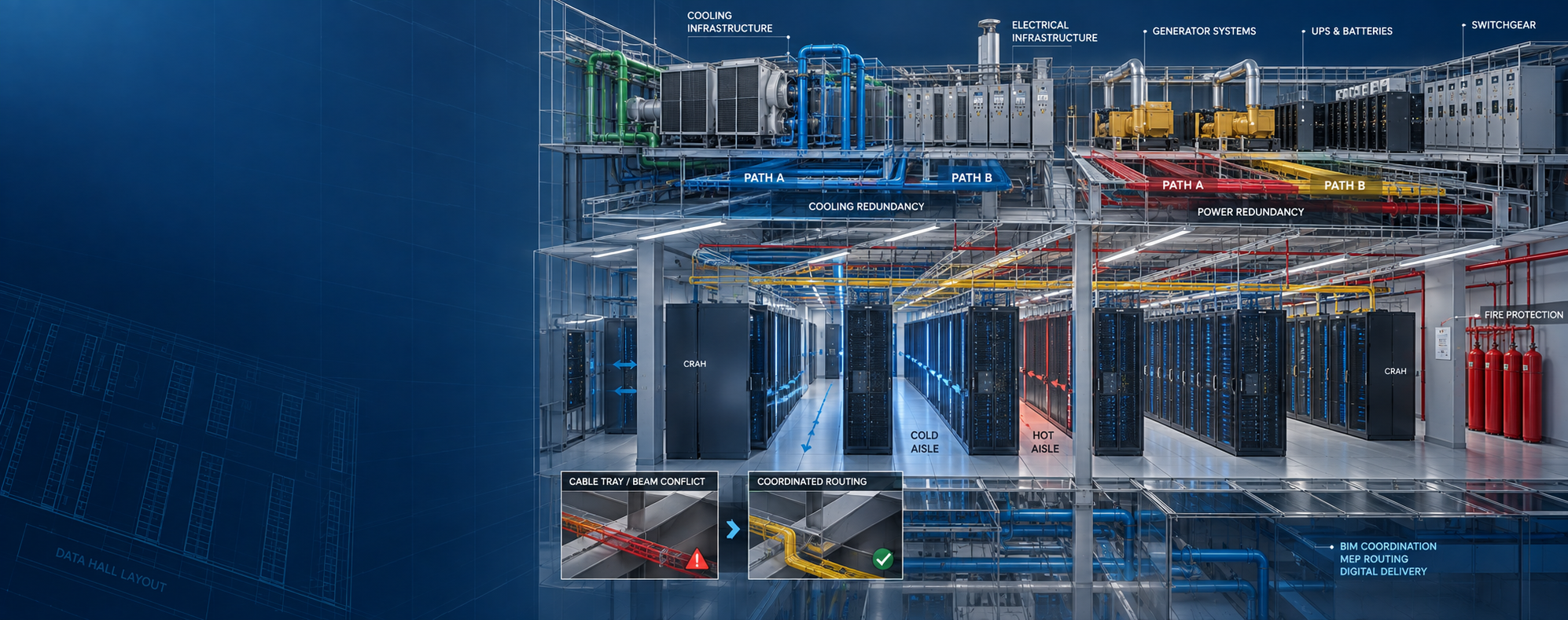
BIM for facility operations and maintenance information
Record BIM → Assets → Facility Records → Change Control → Operations Structured digital information supporting the operational lifecycle.
Facility Operations Capabilities

Prepare BIM Information for Operational Use

Facility BIM should be structured around actual operational information needs — not simply transferred from construction without review.

01 / OPERATIONS BIM

Operations-Ready BIM

Prepare controlled building models around defined facility-information requirements.

02 / EQUIPMENT

Equipment Location Information

Organize selected equipment relative to building, level, room or facility zone.

03 / ASSETS

Facility Asset Information

Connect project-defined asset information with relevant model objects and facility records.

04 / O&M

O&M Information Organization

Structure references to supplied operations, maintenance and equipment documentation.

05 / RECORD MODEL

Record Model Maintenance

Update digital record models using approved facility-change information.

06 / CHANGE

Facility Change Tracking

Support controlled updates after renovation, equipment replacement or operational modifications.

07 / GOVERNANCE

Information Governance

Establish defined ownership, revision and model-update practices.

08 / FM DATA

FM Data Preparation

Structure required BIM and asset information for agreed downstream facility systems.

09 / QA

Facility Information QA

Review model, asset, location and document information before operational use.

Operational Information

Make Facility Information Easier to Find

INFO 01 Building Identify the facility or building containing the required asset.
INFO 02 Level Associate equipment with the relevant floor or model level.
INFO 03 Room / Space Connect assets with required room, space or operational zone.
INFO 04 Asset ID Maintain project-defined equipment or asset identification.
INFO 05 Equipment Type Organize equipment according to approved category or type.
INFO 06 System Associate equipment with project-defined building or facility systems.
INFO 07 Record Reference Connect equipment with available operational project records.
INFO 08 Information Status Identify whether required information is current, pending or superseded.
Operations Information Control

Handover Complete Does Not Automatically Mean Facility Information Is Operations-Ready

A project may deliver models, PDFs, manuals and equipment schedules without those records being organized around the way facility teams need to use them.

Operational readiness requires a clear relationship between the building, assets, locations, systems and supporting information.

Model Delivered Confirms a BIM file exists — not that it is suitable for facility operations.
Asset Information Should align with agreed operational requirements.
Facility Records Should be organized so required information can be located.
Change Process Should define how information remains current after handover.
Facility Information Workflow

From Project Handover to Operational Information

01

Define

Confirm operational information requirements and intended facility use.

02

Review

Review BIM, asset data, drawings, manuals and closeout records.

03

Organize

Structure model, equipment, locations and facility information.

04

Connect

Associate required assets with systems, spaces and records.

05

Validate

Review completeness, model alignment, locations and required information.

06

Operate

Prepare agreed information for facility and downstream system use.

Maintenance Information

Organize Information Around Maintainable Assets

RECORD 01 Equipment Identity Asset ID, equipment type and supplied identification information.
RECORD 02 Manufacturer Information Supplied manufacturer and product information where required.
RECORD 03 Equipment Location Building, level, room or facility-zone information.
RECORD 04 System Relationship Project-defined mechanical, electrical or facility-system association.
RECORD 05 O&M Manual Reference Connection to supplied operation and maintenance documentation.
RECORD 06 Warranty Reference Supplied warranty information where included within the project scope.
RECORD 07 Commissioning Reference Associate provided testing or commissioning information where required.
RECORD 08 Service Information Connect approved maintenance-related references where supplied.
Facility Change Control

Keep the Digital Record Aligned with Physical Changes

CHANGE 01 Renovation Update approved building changes within the facility record model.
CHANGE 02 Equipment Replacement Replace superseded model and asset information with approved updates.
CHANGE 03 Equipment Relocation Update physical and information location records where equipment moves.
CHANGE 04 Space Reconfiguration Update approved room, wall or spatial changes.
CHANGE 05 System Upgrade Reflect approved modifications to project-defined building systems.
CHANGE 06 Asset Retirement Manage removed or superseded asset information according to owner rules.
CHANGE 07 Document Update Update relevant facility-record references when approved information changes.
CHANGE 08 Revision Status Maintain clear model and information revision status.
Facility Information Governance

The Record Model Is Only Useful While It Reflects the Facility

A well-prepared operational model can gradually become unreliable when facility changes are not incorporated.

Information governance should define who updates the record, which changes require model revision, what information is controlled and how superseded information is archived.

Information Ownership Define responsibility for maintaining operational BIM and asset information.
Update Trigger Define which facility changes require information updates.
Revision Control Maintain clear approval and model revision status.
Archive Control Keep superseded information separate from the current facility record.
FM System Readiness

Prepare Information Before Platform Integration

READY 01 Asset Structure Confirm required facility assets are defined consistently.
READY 02 Asset IDs Review identifiers required for model-to-system relationships.
READY 03 Required Fields Confirm downstream system data requirements before export.
READY 04 Location Structure Align buildings, floors, rooms and operational zones.
READY 05 System Structure Organize project-defined facility and equipment system relationships.
READY 06 Document References Confirm required supporting record references are available.
READY 07 Data Validation Review completeness before transferring information downstream.
READY 08 Export Mapping Prepare project-defined information mapping for the intended platform.
Inputs & Deliverables

Facility Records In. Operations-Ready Information Out.

Typical Inputs

  • As-built BIM models
  • Asset registers
  • Equipment schedules
  • O&M manuals
  • Approved submittals
  • Commissioning records
  • Facility naming standards
  • Owner information requirements
  • Existing FM data
  • Approved change records

Typical Deliverables

  • Operations-ready BIM model
  • Updated facility record model
  • Structured asset information
  • Equipment location mapping
  • System mapping
  • O&M document references
  • Facility data QA reports
  • Change-controlled model updates
  • FM-readiness information
  • Project-defined data exports
Facility Information QA / QC

Validate the Digital Record Before Operational Use

Facility information should be reviewed for more than model appearance.

QA can assess asset identity, equipment location, system relationships, required parameters, model revision, document references and information completeness.

Model Revision Check Confirm the intended facility model revision is being used.
Asset Check Review required maintainable assets against scope.
Location Check Confirm equipment is connected with the required facility location.
System Check Review project-defined system relationships where required.
Parameter Check Verify required operational information fields.
Document Check Review required references against supplied facility records.
Change Check Confirm approved facility modifications are represented where required.
Completeness Check Identify missing information before operational delivery.
Facility Applications

Operational BIM Across Complex Facilities

Data Centers Equipment-heavy operational information for complex technical facilities.
Healthcare Facilities Structured building and asset information supporting facility teams.
Industrial Facilities Record BIM and equipment information for operating industrial environments.
Commercial Buildings Digital building and asset information supporting property operations.
Life Sciences Structured operational information for complex building and equipment systems.
Semiconductor & High-Tech Facility information supporting equipment-intensive technical environments.
Education Campuses Record information across buildings and campus facility portfolios.
Hospitality Operational BIM and asset records supporting hotel facility teams.
Multifamily Portfolios Repeatable building-information structures across multiple properties.
Scope Responsibility

BIM Supports Facility Operations — It Does Not Operate or Maintain the Facility

MEP Global Engineering can support operations-ready BIM, asset information, facility records, approved model updates, information governance and FM-readiness workflows.

Physical maintenance, inspections, repairs, equipment servicing, work-order management, BMS operation, controls programming, safety procedures and facility-management decisions remain with the responsible facility professionals.

CMMS, CAFM, IWMS, ERP, BMS, IoT and other operational platforms remain separate systems with separately defined integration requirements.

BIM Information Provides structured digital building and facility information.
Asset Records Organize required equipment information for downstream use.
FM Software Provides operational functionality through a separately selected platform.
Facility Operations Remain under owner, operator and responsible facility-team control.
Frequently Asked Questions

Facility Operations BIM FAQs

How can BIM support facility operations?

BIM can provide a structured digital reference for spaces, systems, equipment, asset locations and related facility information when the model has been prepared for operational use.

Can facility teams use BIM to locate equipment?

Yes. When appropriate location information is structured within the model, selected assets can be associated with buildings, levels, rooms or facility zones.

Can O&M records be associated with BIM assets?

Yes. Project-supplied O&M manuals, equipment records, submittals, warranty information and other documentation can be referenced within an agreed information-management workflow.

Can the BIM record be updated after a renovation?

Yes. Approved renovation, replacement and facility-change information can be incorporated into the record model according to the agreed update process.

Can BIM information be prepared for CMMS, CAFM or IWMS use?

BIM and asset information can be structured around defined downstream data requirements. Actual platform integration depends on the selected system, supported formats, interfaces and separately defined technical scope.

Does this service include physical facility maintenance?

No. The service focuses on BIM, digital facility information, asset records and information-management support. Physical maintenance, repairs, servicing, inspections and operational decisions remain with responsible facility teams.

BIM for Facility Operations

Need to Turn Project BIM into More Usable Facility Information?

Share your as-built models, asset registers, O&M records, facility standards, existing FM information and required operational outputs.

Send Project Details WhatsApp Us
WA Discuss Your Project